Self-Hosted Obsidian Note Sync with TrueNAS, Syncthing, and Docker
Tags: #homelab #obsidian #syncthing #truenas #docker #selfhosted #proxmox
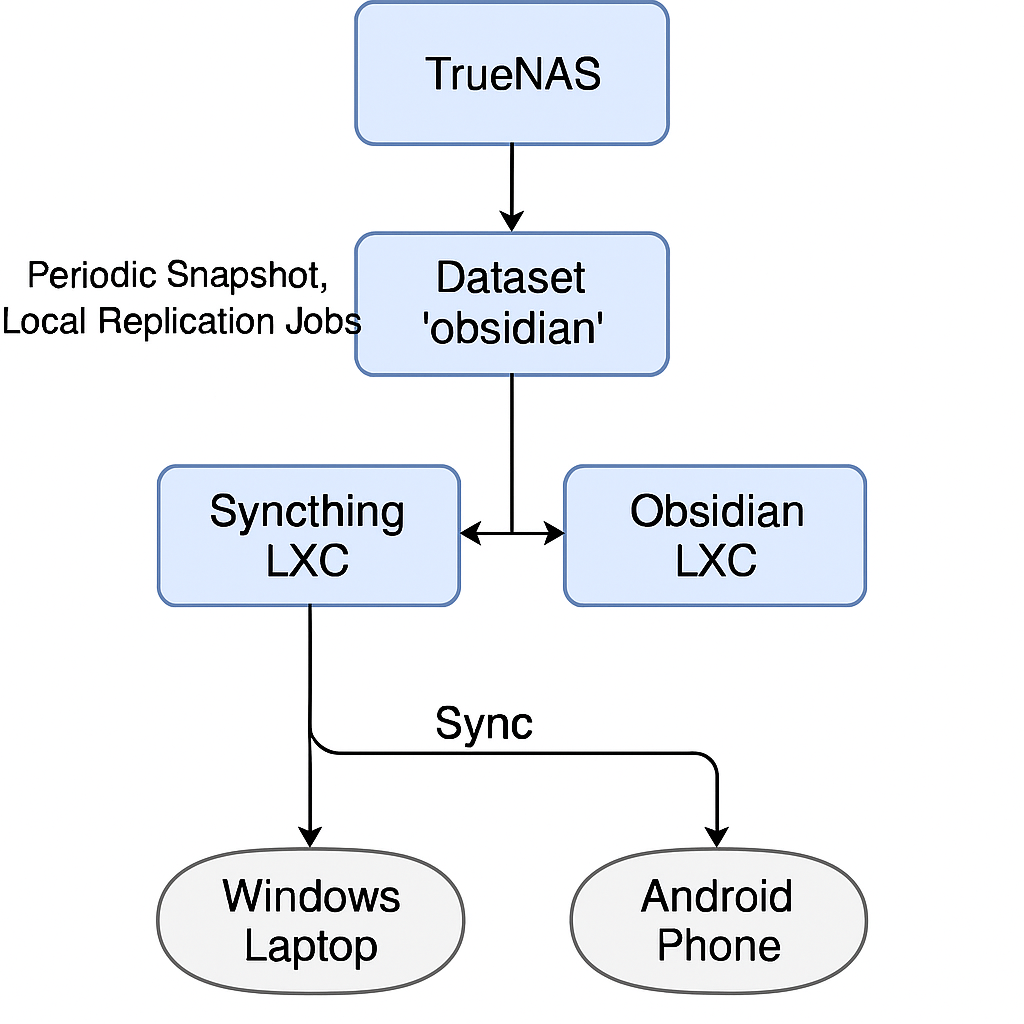
!
📌 Objective#
Create a self-hosted, premium Obsidian experience that:
-
Syncs notes across devices (Windows, Android, future devices)
-
Uses Syncthing to replace Obsidian Sync
-
Runs a local Obsidian Docker instance accessible via Cloudflare Tunnel
-
Leverages TrueNAS for data protection and redundancy
-
Avoids vendor lock-in and monthly subscription fees
🗂️ Step 1: Dataset and User Setup on TrueNAS#
✅ Create Dataset#
# Create dataset

/mnt/[data-set]/obsidian
✅ Create User#
- Username:
obsidian
✅ SMB Share#
-
Shared path:
/mnt/[dataset]/obsidian -
SMB enabled
-
Set ownership and permissions appropriately
✅ Enable Snapshots & Replication#
-
Periodic Snapshot Task: Enabled
-
Local Replication: Enabled
-
Remote Replication (StarkAI site): Pulls the
obsidiandataset
🛠️ Step 2: Syncthing Setup on Proxmox#
✅ Create LXC Container#
✅ Mount Dataset#
Edit /etc/fstab in the Syncthing LXC:
/mnt/[dataset]/obsidian /mnt/obsidian none bind 0 0
Then run:
mount -a
✅ Syncthing Configuration#
-
Folder added:
/mnt/obsidian -
Devices connected:
- Windows laptop
- Android phone
🔁 All changes sync in near real-time across devices.
🐳 Step 3: Obsidian Docker Instance#
✅ Create Docker LXC#
✅ Mount Obsidian Volume#
/mnt/[dataset]/obsidian /mnt/obsidian none bind 0 0
Run:
mount -a
✅ Docker Compose Example#
Create a Docker Compose file for the Obsidian Web instance:
version: '3.8'

services:

  obsidian-web:

    image: ghcr.io/your/image/obsidian-web:latest

    volumes:

      - /mnt/obsidian/homelab:/homelab

    ports:

      - "8080:8080"

    restart: unless-stopped
📁 You can use linuxserver.io/obsidian or an unofficial community image.
🌐 Step 4: Access via Cloudflare Tunnel (TBA)#
🔒 Goal#
-
Use Cloudflare Tunnel for secure remote access
-
Set up authentication with Zero Trust policies
(To be completed…)
🧪 Future Improvements#
-
Add a watchdog to ensure Syncthing stays up
-
Enable 2FA for Obsidian Web
-
Deploy a read-only replica on mobile via web view
-
Daily offsite backups of the dataset
✅ Conclusion#
You now have:
-
Redundant, self-hosted, real-time synced Obsidian notes
-
Cross-device compatibility
-
Docker-based Obsidian access anywhere
-
A setup that avoids cloud lock-in